
BD on designing a portfolio as a digital identity
A portfolio becomes a digital identity when its introduction, work, design and technical choices tell the same clear story about who made it.
A portfolio is often treated as a gallery with a biography attached. That order makes the work do too much. A visitor sees a set of screenshots, then has to infer who made them, what that person cares about, and which examples matter to the next decision.
A stronger portfolio works as a digital identity. Its introduction gives the work a point of view. The projects make that point of view concrete. The page structure and interactions carry the same idea into the experience. Design becomes useful when those parts agree.
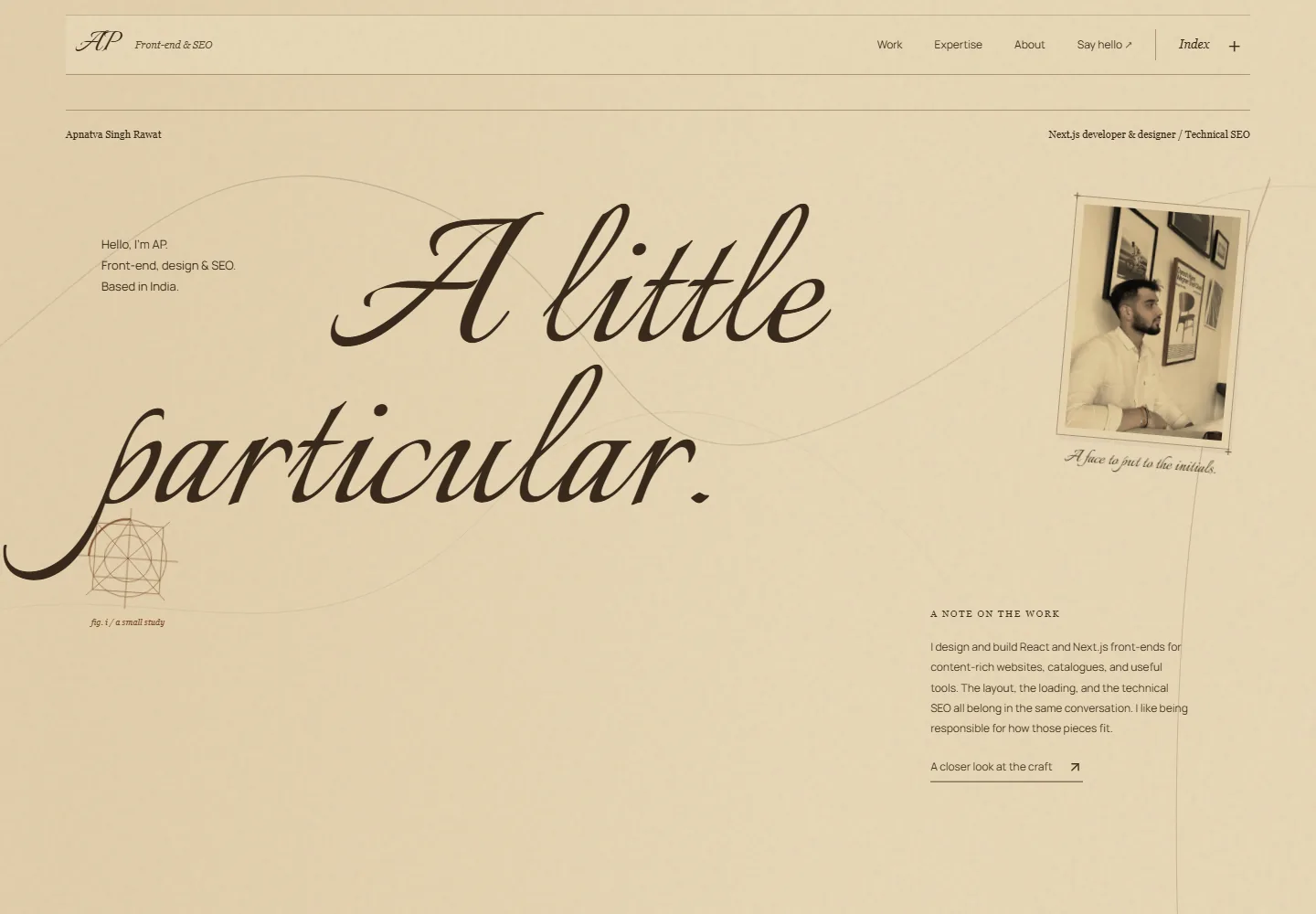
That does not mean every portfolio needs an elaborate art direction. It means choosing what a visitor should understand, then making the content, visuals and technical behaviour support that understanding. The recent full redesign of Apnatva Singh Rawat’s existing portfolio at apnatva.dev gives us a useful example. This was a rework of an established personal website, with a new visual direction for the same person and practice.
A Portfolio Needs a Clear Identity Before It Needs More Projects
The first question is not how many projects to show. It is what kind of work the site should help someone recognise. A front-end developer who also works on technical SEO has a different story from a visual designer who hands off static concepts. A portfolio should make that distinction legible before asking visitors to compare individual pieces.
A useful introduction connects a name to a focus and a way of working. In one portfolio, the hero introduces AP as a front-end developer and designer based in India. The next sentence names React and Next.js work for content-rich websites, catalogues and tools. It also explains that layout, loading and technical SEO belong in the same conversation. Those details turn a broad job label into a more specific identity.
Specificity helps the work earn its place. If the site says it is about design and implementation, projects should show both. If it says search is part of development, the examples should make that connection visible. The identity is a promise about what the visitor will find on the rest of the page.
Each Project Should Answer a Different Question
A project list becomes more persuasive when each entry has a job. One example can show interface and content structure. Another can demonstrate product engineering, data handling or a research prototype. The goal is not to make every item look like the same kind of client engagement. It is to show the range that supports the identity, with enough context to understand each piece.
The portfolio makes those differences visible in its SME OEM/ODM manufacturer entry. Categorized as web performance, it describes a responsive, content-first website for an OEM manufacturer, built around a limited brand palette. It also records asset and page-structure work for performance and SEO, and links to the live website and a separate PDF case study. Forme is identified as an open-source workout planner with browser-local IndexedDB storage and validated JSON import and export. A third example is labelled as a thesis research prototype for adaptive traffic control. The categories and links help a reader distinguish a client website from a product and from academic work.
That distinction protects trust. A prototype is evidence of exploration and implementation. It does not prove a deployed business outcome. A client project can show work performed, but traffic, ranking or revenue claims need their own dated evidence. Describe the part the project can support, then leave the rest unclaimed.
The companion portfolio design case study documents the specific visual and implementation decisions in greater detail. This article stays with the wider lesson: the selection and explanation of projects are part of the identity, not filing work after the design is finished.
Visual Choices Become Identity When They Help Explain the Work
A distinctive visual style can make a portfolio recognisable, but novelty alone is a thin idea. Typography, colour, movement and imagery should help organise attention or express the character of the work. A visual system feels personal when those choices reinforce a clear point of view.
The redesign draws on Italian Renaissance and da Vinci workbook aesthetics through a paper-like palette, expressive type, notebook marks and geometric studies. Scrollytelling carries that idea through practice notes, project work and technical reflections. The notebook feels like a working journal because the sections provide the substance its appearance suggests, showing how ideas move into implemented pages.
That relationship is more useful than decoration alone. If the page promises a hands-on practice, its details can show materials, decisions and work in progress. If it promises precision, its visual rhythm can be calmer and more deliberate. The style should be distinctive enough to remember and restrained enough to leave the work readable.
The Interaction Should Keep the Identity Easy to Access
Motion can support a portfolio's character, especially when it guides a reader through a long page. It can also get between the reader and the information. The practical test is whether the site still communicates when animation is reduced, a keyboard is used, the screen is narrow or the page has not finished loading.
The portfolio respects reduced-motion preferences when adding its scroll effects. The hero names the work in visible text, the sections have direct links, and the contact area remains a distinct part of the page. These choices keep the identity accessible when a visitor prefers a quieter experience.
The same principle applies to layout. Put enough information near each project to make it understandable without requiring a visitor to open every destination. Make links describe where they lead. Keep contact easy to find. A portfolio can feel expressive while staying straightforward to use.
A Digital Identity Is a Story Told Across the Whole Page
An identity does not live in the hero alone. A name and role introduce it. Practice sections clarify the work. Projects provide evidence. Notes reveal how decisions are made. Experience and contact give the visitor a way to continue. When every section points in a different direction, a polished opening cannot hold the story together.
AP’s portfolio moves through that sequence. It begins with his focus, then explains front-end development and technical SEO, shows projects, records working principles, and gives visitors a route to contact. The sections return to thoughtful interfaces, the implementation beneath them, and the discovery layer around them, with each section adding a different kind of evidence.
This is also where technical work supports identity. Clear headings and meaningful links help people move through the page. Useful metadata and rendered content help services understand what each page contains. Google recommends creating helpful, people-first content and making the site's purpose clear. That is sound guidance for a portfolio too, though it is not a guarantee of search visibility.
Review a Portfolio by Following One Visitor's Path
Choose a likely visitor and give them one real question to answer. A prospective client may want to know whether you work on existing websites. A hiring manager may need to see the technical depth behind a visual project. A collaborator may be looking for a clear way to get in touch.
Now follow the page in order. Can the visitor identify the person and focus from the opening? Does each selected project support that focus? Is the evidence labelled accurately? Can the page's structure be understood without relying on motion? Is the next step obvious? If one answer is no, add or revise the information that closes that gap before adding another project.
For a business considering a portfolio or service website, BD's Website Development service connects planning, page structure, implementation and contact paths. The right scope depends on the site's purpose and the material available. The portfolio is one useful format when the work itself needs to explain the identity.
Build an Identity the Work Can Support
A portfolio becomes a digital identity when its introduction, selected work, visual language and implementation all tell a compatible story. The useful question is not whether it looks unusual. It is whether a visitor can understand who made it, what that person does, and where the work gives them reason to believe it.
Start with that story. Choose projects that make it concrete. Let the design carry it, and make sure the experience still works when the effects are gone. Then the portfolio feels like a person and a practice, not a folder of screenshots.
Sources and Supporting Material
These references support factual claims in the article. Brownsmith's interpretation and forward-looking analysis remain editorial judgement rather than vendor promises.
Discovery and BizFlow
Apply This Idea to Your Business.
Connect your website, search visibility and useful content to a clear enquiry path.
Brownsmith Dynamics supports small, well-funded teams of 1–50 people, including funded startups and established family businesses. Discovery helps with distribution through websites, SEO and content. BizFlow helps teams scale with connected systems and automation.
Get a Quote
Connect your website, search visibility and useful content to a clear enquiry path.
Tell Us What You Need
Share your email and a business goal or challenge. We will reply with a practical next step.
Website Development
Plan a Website Around Its Purpose and Audience
See how BD scopes and builds websites for service companies, including page structure and contact paths.
Explore Website Development